Chedoku Puzzle Rules
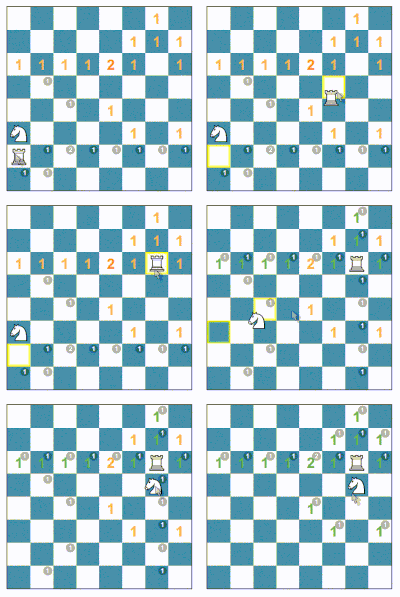
Some squares on the board show a large number. This number is the target. It tells how many pieces must threaten that square. Move the chess pieces until each square has the correct number of threats.
A white piece adds one threat (+1). A black piece removes one threat (−1).
How each chess piece threatens squares
Pawn (♙)
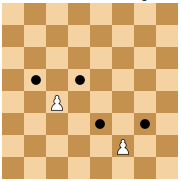
A pawn threatens the two squares diagonally in front of it. A pawn does not threaten the square directly in front of it.
King (♔)
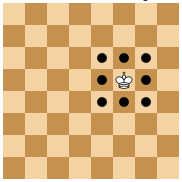
A king threatens each square next to it, in all directions.
Rook (♖)
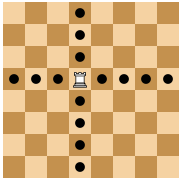
A rook threatens all squares along its row and its column. Another piece stops the line.
Bishop (♗)
A bishop threatens all squares along its diagonals. Another piece stops the line.
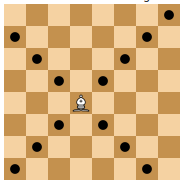
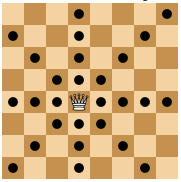
Queen (♕)
A queen threatens like a rook and a bishop together: along its row, its column and its diagonals. Another piece stops the line.
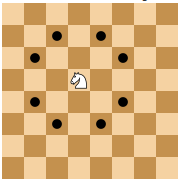
Knight (♘)
A knight threatens in an "L" shape: two squares in one direction, then one square to the side. The knight is the only piece that can jump over other pieces.
Frequently asked questions
Must I obey the rules of chess when I move a piece?
No. Chedoku uses the rules of chess only to count the threats. You can move a piece to any empty square. A puzzle can show a position that is not possible in real chess. For example, a puzzle can have many pieces, a pawn on the first or last row, no king, or no pieces of one color.
Is there a limit on moves or time?
No. You can move the pieces as many times as necessary. When you find a solution, the game shows the number of moves and the time.
Can I remove a piece or add a piece?
No. You can only move the pieces that are on the board.
What do the colors of the numbers mean?
Green shows that the square has the correct number of threats. Red shows that the number of threats is not correct. A darker red shows a larger difference.
What is the difference between the large and the small numbers?
The large number is the target threat for the square. The small number is the current threat from the pieces in their current positions. To hide the small numbers, use the Hints setting.
What is the difference between a valid solution (☑️) and a perfect solution (✅)?
Some puzzles have more than one solution. When all squares with a large number have the correct threat, you have a valid solution (☑️). Other squares can also have threats in a valid solution.
When all squares with a large number have the correct threat and all other squares have zero threat, you have a perfect solution (✅). To see a perfect solution, tap the eye icon.
Puzzles with black pieces make a perfect solution more difficult. A white threat (+1) and a black threat (−1) on the same square cancel each other. Thus, a square with zero threat can have two pieces of opposite colors that threaten it.
Too easy? Do you have more difficult puzzles?
Yes. Use the level controls on the Practice tab to select a higher level. More pieces and more black pieces make a puzzle more difficult.
Too difficult? Do you have easier puzzles?
Yes. Start with the Tutorial tab. Then play the low levels. Puzzles with few pieces and no black pieces are the easiest.
For solving strategies, read part 1 and part 2 of our guide on the blog.